

How Request Signing Works
When the Nmbr Component needs to interact with the Nmbr API (for example, to load payroll data or submit changes), it does not call the API directly. Instead, it follows a three-step signing flow:1. The Component Intercepts the Request
Before any API call leaves the browser, the Nmbr Component intercepts it and extracts the request body. This body contains the data that will be sent to the Nmbr API.2. Your Server Signs the Request
The component sends the request body to the signing endpoint you configured during initialization (viasigningUrl or a custom sign function). Your server:
- Receives the JSON request body
- Signs the body as a JWT using the SHA-256 hash of your API Secret and the HS256 algorithm
- Returns the signed JWT token to the component
3. The Component Calls the Nmbr API
The component takes the signed JWT returned by your server and includes it with the API request to the Nmbr API. The Nmbr API validates the signature to confirm the request was authorized by your server before processing it.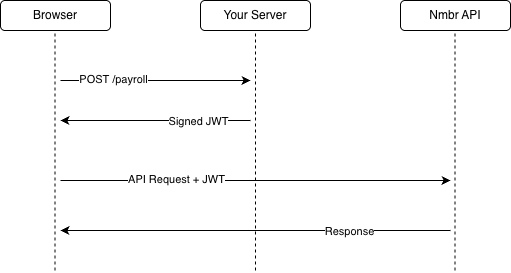
Why This Architecture?
API Secret Never Leaves Your Server
The signing flow ensures that your API Secret is only ever used server-side. The browser never has access to it, which eliminates the risk of credential exposure through client-side code, browser extensions, or network inspection.You Control Authorization
Your signing endpoint is a server-side route in your application. This means you can enforce your own authentication and authorization logic before signing any request. For example, you can verify that the current user is logged in and has permission to administer payroll before returning a signature.Every Request is Verified
The Nmbr API validates the JWT signature on every incoming request. If a request has been tampered with or was not signed by your server, it will be rejected.Signing Endpoint Requirements
Your signing endpoint must:- Accept
POSTrequests with a JSON body - Sign the body as a JWT using the HS256 algorithm
- Use the SHA-256 hash of your API Secret as the signing key (hex-encoded or base64-encoded)
- Return the signed JWT as plain text with a
201status code - Be protected by your own authentication and authorization. See Authenticating the Signing Request below
The Signed Payload
The Component builds the JWT payload for each API request. YoursigningUrl or sign function should sign the JSON it receives as-is. You do not need to create or change the JWT claims.
If you inspect or build the payload yourself, set the uri claim to the API request path, including the query string when one is present. Exclude the scheme, host, and /services/payroll base path.
For example:
GET https://sandbox.nmbr.co/services/payroll/employees?per_page=5→uri: "/employees?per_page=5"GET https://sandbox.nmbr.co/services/payroll/employees→uri: "/employees"
Authenticating the Signing Request
Note: cookies are not sent to your signing endpoint by default. The following approaches are supported:Bearer Authentication
Send a token in an HTTP header on every signing request and validate it server-side. The token can be an API key, signed token, or bearer JWT from your own auth system. Use the customsign function below to attach the header. signingUrl does not support custom headers.
Cookie Authentication
If your architecture specifically requires cookie-based auth, the customsign function below lets you write your own fetch call with credentials: 'include'.
Custom Signing Function
If your application architecture requires more control over the signing process (for example, if you need to add custom headers or use a different transport), you can provide asign function instead of a signingUrl when initializing the component:
Best Practices
- Protect your signing endpoint: Ensure it is behind authentication so that only logged-in users with the appropriate permissions can request signatures.
- Store your API Secret securely: Use environment variables or a secrets manager. Never hard-code it in source files or commit it to version control.
- Use HTTPS: All communication between the browser, your server, and the Nmbr API should be over HTTPS to prevent interception.
- Limit access: Only users who need to administer payroll should be able to reach the signing endpoint.